In 2026, browser automation has become more powerful, accessible, and intelligent than ever before. What once required advanced programming knowledge can now be achieved with beginner-friendly and even AI-powered tools.
The good news? Many of the best browser automation solutions are free and open source.
In this guide, we explore the best browser automation tools in 2026, their features, strengths, weaknesses, and how to choose the right one for your needs.
What Is Browser Automation?
Browser automation refers to the use of software tools to automatically perform actions inside a web browser without human intervention.
Instead of manually opening websites, clicking buttons, entering information, or collecting data, automation software handles these tasks automatically.
Browser automation can perform activities such as:
Filling online forms
Logging into websites
Testing web applications
Downloading reports
Scraping web data
Processing repetitive workflows
Monitoring websites
Generating PDFs from web pages
For businesses, this can save hours of repetitive work every week.
For developers, it improves productivity and reduces manual errors.
Why Browser Automation Matters in 2026
The internet is becoming increasingly central to how businesses operate. Companies now rely on web-based portals for:
Vendor management
Government submissions
Banking operations
HR onboarding
Customer support systems
E-commerce operations
As these systems grow, manual work becomes inefficient.
Instead of manually completing repetitive tasks every day, automation handles them in minutes.
A task that takes an employee three hours weekly could be completed automatically in seconds.
2. Reduce Human Error
People make mistakes when repeatedly entering data or copying information.
Automation performs tasks consistently and accurately.
3. Improve Productivity
Employees can focus on more strategic work instead of repetitive browser tasks.
4. Scale Operations
Businesses can automate hundreds or thousands of repetitive actions without hiring additional staff.
This makes browser automation valuable for startups, developers, agencies, and growing businesses.
Top Free Open-Source Browser Automation Tools in 2026
Several tools dominate the browser automation ecosystem in 2026. Each serves different audiences and technical needs.
1. Skyvern – Best AI-Powered Browser Automation Tool
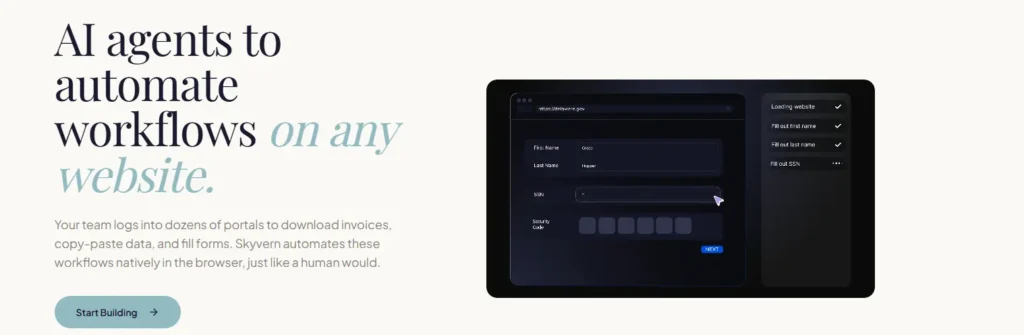
One of the biggest shifts in browser automation is the rise of AI-powered automation, and Skyvern is leading this trend. Instead of relying heavily on fragile selectors and manual scripting, Skyvern uses artificial intelligence and computer vision to interact with websites.
Why Skyvern Stands Out
Traditional automation tools often break whenever a website changes its layout.
For example:
If a website moves a login button or updates its design, older automation scripts may stop working.
Skyvern aims to solve this problem using AI to understand websites more like humans do.
Pros
Less maintenance
Works across unfamiliar websites
Beginner-friendly approach
Handles complex workflows intelligently
Cons
Still relatively new compared to older frameworks
Best For:
Businesses and small teams that want automation without constant coding and maintenance.
2. Selenium – The Industry Veteran
When people think of browser automation, Selenium is often the first tool that comes to mind.
Selenium has existed for years and remains one of the most trusted automation frameworks for developers. It supports multiple browsers and programming languages, making it highly flexible.
Why Developers Love Selenium
Selenium offers:
Cross-browser testing
Multi-language support
Large community support
Extensive documentation
Developers can write automation scripts in:
Python
JavaScript
Java
C#
Ruby
Downsides
Selenium comes with a learning curve.
Beginners may struggle with setup, browser drivers, and script maintenance.
Website changes can also break automation scripts frequently.
Best For:
Developer teams that want maximum control and flexibility.
3. Playwright – The Modern Automation Framework
Created by Microsoft, Playwright has quickly gained popularity for modern web automation.
Playwright supports major browsers including:
Chromium
Firefox
Safari/WebKit
One of its strongest features is automatic waiting.
Instead of failing when elements load slowly, Playwright intelligently waits for page elements to become ready.
Advantages
Excellent browser support
Faster and more reliable testing
Great debugging tools
Cleaner developer experience
Limitations
Its ecosystem is still smaller than Selenium’s.
Although growing rapidly, community support is not yet as massive.
Best For:
Developers building modern web automation workflows.
4. Puppeteer – Best for Chrome Automation
If your work revolves around Google Chrome or Chromium-based browsers, Puppeteer is worth considering.
Built by Google, Puppeteer provides a powerful API for browser automation. It is especially useful for:
Web scraping
PDF generation
Automated screenshots
Browser testing
One major benefit is speed.
Because Puppeteer connects directly with Chrome’s developer protocol, it can be extremely fast.
Drawbacks
Puppeteer mainly focuses on Chromium-based browsers.
This limits cross-browser compatibility.
Best For:
JavaScript developers focused on Chrome automation.
5. Cypress – Best for Testing Websites
Cypress has become a favorite among developers for website testing.
Unlike traditional testing tools, Cypress provides an easier debugging experience.
Developers can visually inspect each step of a failed test, making troubleshooting easier.
Benefits
Easy setup
Great debugging experience
Fast testing
Strong developer tools
Weaknesses
Cypress focuses heavily on testing rather than general-purpose browser automation.
It may not be ideal for business workflow automation.
Best For:
Teams focused on web application testing.
Browser Automation Comparison Table
Tool
Best Use Case
Technical Skill Needed
Browser Support
Best For
Skyvern
AI Automation
Beginner to Intermediate
Multiple
Small teams
Selenium
Testing & Automation
Advanced
All Major Browsers
Developers
Playwright
Modern Automation
Intermediate
Multiple
Modern apps
Puppeteer
Chrome Automation
Intermediate
Chrome-Based
JavaScript users
Cypress
Website Testing
Beginner to Intermediate
Limited
QA Testing
How to Choose the Right Browser Automation Tool
Before choosing a browser automation platform, ask yourself these questions:
Do You Know Programming?
If you are not technical, AI-powered tools may be easier.
If you are a developer, Selenium or Playwright may offer greater flexibility.
What Are You Automating?
Different tools work better for different tasks.
For example:
Testing websites → Cypress or Playwright
General browser automation → Selenium
AI workflow automation → Skyvern
Chrome scraping → Puppeteer
How Much Maintenance Can You Handle?
Traditional automation tools may require constant updates when websites change.
AI-powered automation attempts to reduce this maintenance burden.
The Future of Browser Automation
The biggest trend in 2026 is clearly AI-powered browser automation.
Instead of manually programming every click and selector, newer systems can understand websites visually and adapt automatically.
This shift could make browser automation accessible to:
Small businesses
Freelancers
Non-technical entrepreneurs
Digital agencies
In the coming years, browser automation will likely become even easier, smarter, and more autonomous.
Final Thoughts
Browser automation is no longer a luxury—it is becoming a necessity.
Whether you are a developer, business owner, startup founder, or digital entrepreneur, automation can save time, reduce errors, and improve efficiency.
The best part is that many powerful tools are completely free and open source.
If you want maximum control, Selenium remains a strong option.
If you prefer modern architecture, Playwright is worth exploring.
If speed matters, Puppeteer shines.
For testing, Cypress stands out.
And for businesses looking for low-maintenance automation, AI-powered platforms are beginning to reshape the future of browser automation.
As we move deeper into 2026, one thing is clear: businesses that automate repetitive browser tasks will gain a serious productivity advantage.