
Many applicants participating in the Civil Defence, Correctional, Fire and Immigration Services Board (CDCFIB) recruitment exercise have misplaced their application acknowledgment slip or forgotten their application number. Read How to Recover Your CDCFIB Application and be calm.
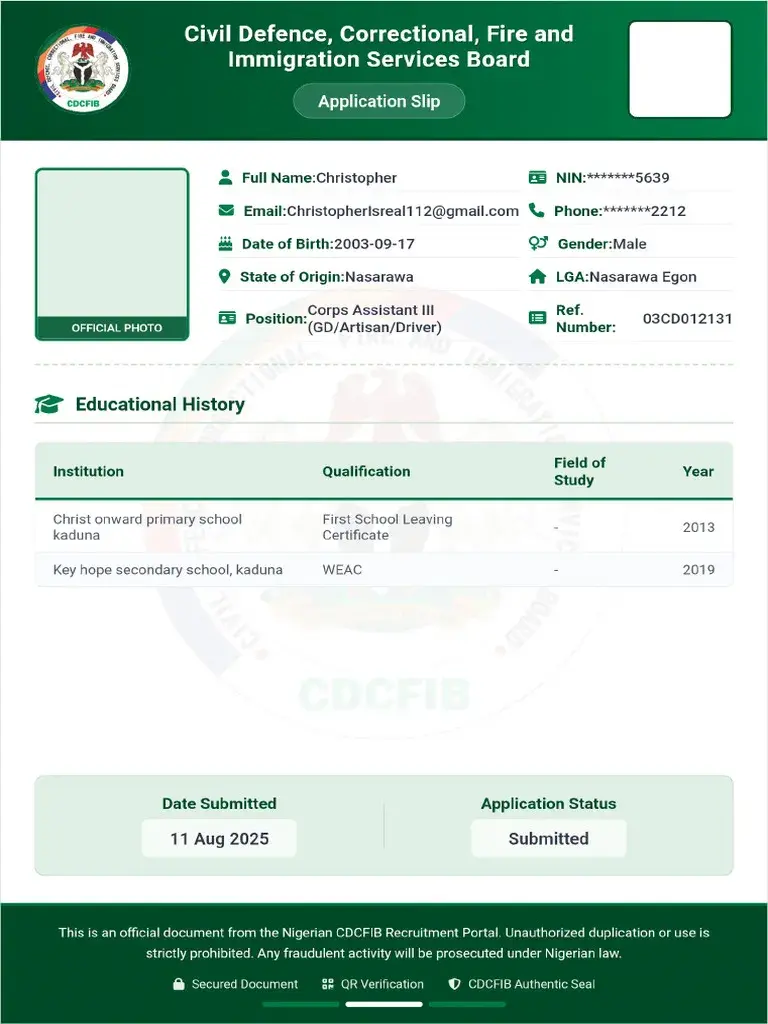
With the ongoing screening and verification process, having access to your application details is important for checking your recruitment status and completing the next stages of the exercise.
Table of Contents
READ: CDCFIB Recruitment 2026: Physical Screening, Document Verification & Shortlisted Candidates Update
If you have lost your CDCFIB application slip, don’t panic. This guide explains practical steps you can take to recover your application information.
READ: CDCFIB Recruitment Update: Seeing “Your Application Was Not Shortlisted?” Read This Before You Panic
What Is the CDCFIB Application Slip?
The CDCFIB application slip is the acknowledgment document generated after successful submission of your recruitment application.
The slip usually contains:
- Application Number
- Applicant’s Full Name
- Email Address
- Position Applied For
- Registration Date
- Recruitment Reference Details
Applicants are advised to keep this slip safe because it may be required during screening and document verification.
Why Is the Application Slip Important?
Your application slip may be required for:
- Checking shortlist status
- Accessing the recruitment portal
- Physical screening
- Document verification
- Future recruitment correspondence
Without your application number, it may become difficult to access certain recruitment services.
READ: CDCFIB Recruitment Update: Physical Screening to Begin Soon
How to Recover a Lost CDCFIB Application Slip
1. Check Your Email Inbox
After completing your application, CDCFIB may have sent a confirmation message to the email address used during registration.
Search your email inbox for:
- CDCFIB
- Recruitment Confirmation
- Application Acknowledgment
- Civil Defence Recruitment
- Immigration Recruitment
- Fire Service Recruitment
Also check:
- Spam Folder
- Promotions Folder
- Junk Mail Folder
Many applicants successfully recover their application number through their email confirmation.
2. Check Downloaded Files on Your Device
If you downloaded or printed your acknowledgment slip after registration, it may still exist on your:
- Downloads Folder
- Documents Folder
- Desktop
- Google Drive
- OneDrive
- Phone Storage
Search using keywords such as:
- CDCFIB
- Acknowledgment
- Application Slip
- Recruitment
3. Log Into the Recruitment Portal
If the recruitment portal provides login access, attempt to log in using the details used during registration.
These may include:
- Email Address
- Phone Number
- Application Number
Some portals allow applicants to reprint acknowledgment slips directly from their dashboard.
4. Use the “Forgot Application Number” Option
Where available, use any recovery feature provided on the recruitment portal.
You may be asked to provide:
- Registered Email Address
- Phone Number
- Full Name
- Date of Birth
Follow the instructions carefully to retrieve your application information.
5. Contact CDCFIB Support
If you cannot recover your application details through the portal, contact official CDCFIB support channels for assistance.
When contacting support, provide:
- Full Name
- Registered Email Address
- Phone Number
- Position Applied For
- Date of Application
Providing accurate information will help officials locate your record faster.
Can I Participate in Screening Without My Application Slip?
Requirements may vary depending on the recruitment stage.
Applicants are strongly advised to recover or reprint their acknowledgment slip before physical screening and document verification.
Always follow the latest instructions published by CDCFIB.
How to Prevent Losing Important Recruitment Documents
To avoid future issues:
- Save copies of your application slip on your phone and computer.
- Upload important documents to cloud storage.
- Print a hard copy for safekeeping.
- Save your application number in a secure location.
- Keep recruitment emails for future reference.
What Should Applicants Do Now?
If you have misplaced your CDCFIB application slip:
✅ Check your email inbox.
✅ Search your device storage.
✅ Attempt portal login.
✅ Use available recovery options.
✅ Contact official support if necessary.
The earlier you recover your application details, the easier it will be to complete the screening and verification process.
Frequently Asked Questions
Can I Recover My CDCFIB Application Number?
Yes. Many applicants can recover their application number through their registration email, recruitment portal, or official support channels.
Can I Reprint My CDCFIB Application Slip?
If the recruitment portal provides a reprint option, you may be able to download another copy after logging in.
What If I Forgot My Registered Email Address?
You may need to contact official recruitment support and provide other identification details to verify your application.
Is the Application Slip Required for Screening?
Applicants should keep their acknowledgment slip available because it may be requested during screening and document verification.
Final Thoughts
Losing your CDCFIB application slip does not necessarily mean losing your recruitment opportunity. By checking your email, searching your device, accessing the recruitment portal, and contacting official support when necessary, you can often recover your application details successfully.
Applicants should act quickly and ensure all recruitment documents are safely stored before the screening process begins.
Related Searches:
- How to Recover CDCFIB Application Number
- CDCFIB Acknowledgment Slip Reprint
- Lost CDCFIB Application Slip
- CDCFIB Recruitment Portal Login
- CDCFIB Shortlisted Candidates
- CDCFIB Physical Screening Requirements
- CDCFIB Document Verification
- CDCFIB Recruitment Update 2026