Latest developments: Why learning how to build a WordPress website matters in 2026
This month, recent updates across the WordPress ecosystem—including performance improvements, block editor enhancements, and new hosting integrations—are reshaping how beginners launch websites. These changes matter now because more individuals and small businesses are moving online in 2026, increasing demand for fast, scalable, and affordable web solutions. For beginners, understanding how to build a WordPress website has become a critical digital skill, especially as competition for online visibility intensifies globally.
What does it mean to build a WordPress website from scratch?
Building a WordPress website from scratch means creating a fully functional website using the WordPress content management system (CMS), starting from domain registration and hosting setup to design, content creation, and publishing.
It does not require coding knowledge, making it accessible to beginners while still offering advanced customization options for professionals.
Why more beginners are learning how to build a WordPress website in 2026
Recent updates driving adoption
Recent updates to WordPress core have improved speed, security, and usability. The block editor (Gutenberg) now allows drag-and-drop functionality, reducing reliance on third-party page builders.
Growth in digital presence
Businesses, creators, and freelancers are prioritizing online visibility. A website is now considered a foundational digital asset rather than an optional tool.
Expansion of no-code tools
The rise of no-code solutions has made it easier than ever to build a website from scratch, even without technical experience.
How to build a WordPress website step-by-step in 2026
Step 1: Choose a domain name
A domain name is your website’s address on the internet. It should be:
- Short and memorable
- Relevant to your niche
- Easy to spell
Popular domain registrars include services recognized by industry bodies such as ICANN.
Step 2: Select reliable hosting
To build a WordPress website, hosting is required. Hosting providers store your website files and make them accessible online.
Key factors to consider:
- Speed and uptime
- Security features
- Customer support
- WordPress compatibility
Step 3: Install WordPress
Most hosting providers offer one-click WordPress installation. This simplifies the setup process significantly.
After installation, users can access their dashboard via:
- yourdomain.com/wp-admin
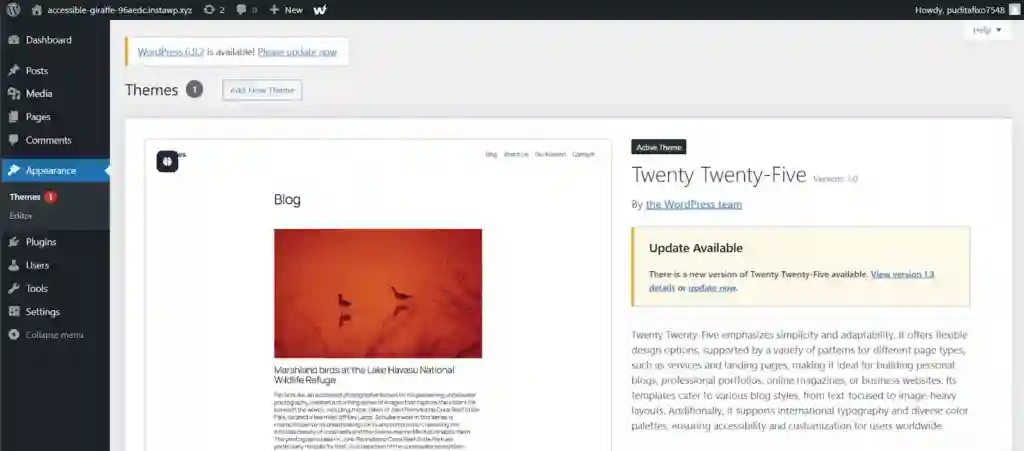
Step 4: Choose a theme
Themes control the design and layout of your website.
Free and premium themes are available, and many are optimized for mobile responsiveness and SEO.
Step 5: Customize your website
Using the WordPress customizer or block editor, users can:
- Adjust colors and fonts
- Create pages
- Add menus
- Upload logos
Step 6: Install essential plugins
Plugins extend functionality. Common plugins include:
- SEO tools
- Security plugins
- Performance optimization tools
- Contact form builders
Step 7: Create content
Content is the core of any website. Beginners should start with:
- Homepage
- About page
- Contact page
- Blog posts
Step 8: Launch your site
Once everything is set, your website can go live. Regular updates and maintenance are essential for performance and security.
WordPress tutorial for beginners: Key features explained
What is WordPress?
WordPress is an open-source CMS that allows users to create and manage websites without coding.
Why is WordPress popular?
- Flexibility
- Scalability
- Large community support
- Thousands of themes and plugins
How to build a WordPress website without coding
Using the block editor
The Gutenberg editor allows users to create layouts using blocks such as:
- Text blocks
- Image blocks
- Video embeds
Drag-and-drop functionality
Modern WordPress tools eliminate the need for manual coding, making it easier for beginners to design professional websites.
What this means for beginners building a website from scratch
Lower barrier to entry
Anyone with basic computer skills can now build a website from scratch.
Faster development time
Websites that once took weeks can now be built in hours.
Increased competition
As more people go online, standing out requires better design and content.
Common mistakes when learning how to build a WordPress website
Choosing the wrong hosting provider
Poor hosting can lead to slow load times and downtime.
Ignoring mobile optimization
Mobile traffic continues to dominate, making responsive design essential.
Overloading plugins
Too many plugins can slow down your site and cause conflicts.
How to build a WordPress website optimized for SEO
Keyword optimization
Using relevant keywords like “how to build a WordPress website” improves search visibility.
Fast loading speed
Speed is a ranking factor. Optimized images and caching plugins help improve performance.
Quality content
Search engines prioritize valuable and relevant content.
Create WordPress site 2026: Trends shaping website development
AI integration
AI tools are being integrated into WordPress for content generation and design suggestions.
Voice search optimization
Websites are increasingly optimized for voice queries.
Enhanced security features
Security updates are becoming more advanced to protect user data.
How to build a WordPress website for different purposes
Business websites
Focus on:
- Services
- Testimonials
- Contact forms
Blogs
Prioritize:
- Content quality
- SEO optimization
- Consistent posting
E-commerce sites
Use plugins like WooCommerce to sell products online.
WordPress guide for beginners: Essential tools and resources
Learning platforms
Many online platforms offer tutorials and courses for beginners.
Community forums
WordPress has an active community that provides support and resources.
FAQ: How to build a WordPress website
How long does it take to build a WordPress website?
A basic website can be built in a few hours, while more complex sites may take several days or weeks.
Is WordPress free?
WordPress software is free, but hosting and domain registration require payment.
Do you need coding skills?
No, beginners can build a WordPress website without coding.
What happens next in WordPress development
Continued innovation
WordPress is expected to release more updates focused on performance and usability.
Increased adoption
More businesses and individuals are likely to adopt WordPress as their primary website platform.
What to watch in the coming months
- New WordPress feature releases
- Changes in hosting technologies
- Growth of AI-powered website tools
- Increasing competition in online spaces