
This month, more professionals, freelancers, and students are launching personal portfolio websites as recent updates in hiring trends, remote work, and creator economies make online visibility more critical than ever. In the current year, recruiters and clients increasingly expect a clean, fast, and credible portfolio website rather than just social media profiles or PDFs. These latest developments matter now because WordPress has rolled out ecosystem improvements, lighter themes, and better performance tools that make building a simple portfolio website easier, faster, and more discoverable for beginners and professionals alike. This post discusses How to Design a Simple Portfolio Website on WordPress.
A well-designed WordPress portfolio website is no longer optional. It is becoming a baseline requirement across creative, technical, and professional fields.
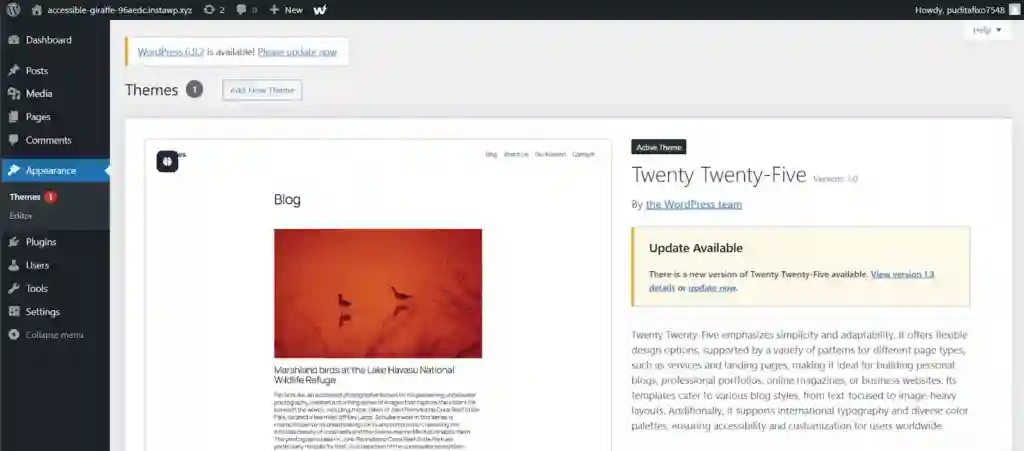
Table of Contents
WordPress portfolio website design: why simplicity is dominating in the current year
The dominant trend in WordPress portfolio website design this year is simplicity. Recent updates in user experience standards, page speed benchmarks, and mobile-first indexing have pushed minimalist layouts to the forefront.
Simple portfolio websites perform better because they:
- Load faster on mobile and desktop
- Highlight work samples without distractions
- Align with modern hiring and client review behavior
- Meet search engine quality and usability expectations
Minimalist design is not about removing value. It is about removing friction.
What is a WordPress portfolio website?
A WordPress portfolio website is a personal or professional site built on WordPress that showcases work, skills, projects, and credentials. It typically includes pages such as a homepage, portfolio or projects section, about page, and contact page.
In 2026, the most effective portfolio websites are focused, content-light, and structured for clarity rather than volume.
Who needs a portfolio website right now?
The demand for portfolio websites has expanded beyond designers and developers.
Professionals increasingly using WordPress portfolio websites include:
- Web designers and developers
- Digital marketers and content creators
- Writers, journalists, and editors
- Photographers and videographers
- Tech professionals and analysts
- Students and career switchers
This shift reflects how hiring, freelance work, and client discovery are happening online this year.
Why WordPress is still the best platform for portfolio websites
Despite the rise of no-code builders, WordPress remains the most widely used platform for portfolio websites due to flexibility, ownership, and scalability.
Key advantages of WordPress for portfolios
- Full content ownership
- Thousands of lightweight themes
- Plugin ecosystem for growth
- Strong SEO and Discover compatibility
WordPress also integrates seamlessly with monetization options, analytics tools, and performance enhancements, making it future-ready.
Latest developments in WordPress that affect portfolio design
Recent updates across the WordPress ecosystem have changed how simple portfolio websites are built.
Performance-focused core updates
WordPress has prioritized performance, reducing load times and improving Core Web Vitals. This directly benefits minimalist portfolio websites.
Block editor improvements
The block editor now offers more layout control without requiring page builders, allowing beginners to design clean portfolios using native tools.
Theme ecosystem shift
Theme developers are moving away from bloated multipurpose themes toward focused, single-purpose designs optimized for speed and clarity.
How to create a portfolio on WordPress: step-by-step overview
Designing a simple portfolio website on WordPress follows a structured process.
Step 1: Choose the right WordPress setup
There are two primary options:
- Self-hosted WordPress (WordPress.org)
- Hosted WordPress platforms
Self-hosted WordPress provides maximum control, which is preferred for professional portfolios.
Step 2: Select a clean, minimalist theme
The foundation of WordPress portfolio website design is the theme. Simple WordPress portfolio themes prioritize typography, whitespace, and responsiveness.
Step 3: Install only essential plugins
Minimal portfolios work best with fewer plugins, focusing on performance and security rather than features.
Step 4: Create core pages
Every portfolio website should clearly present:
- Homepage
- Portfolio or projects
- About page
- Contact page
Each page should have a specific purpose and minimal distractions.
Simple WordPress portfolio themes that work this year
Theme selection plays a major role in how a portfolio performs.
Characteristics of effective portfolio themes
- Lightweight codebase
- Mobile-first design
- Gutenberg compatibility
- Minimal animations
Themes designed specifically for portfolios outperform general-purpose themes in speed and usability.
Minimalist WordPress portfolio design principles
Minimalist design is guided by clarity and intention.
Layout simplicity
Content should be easy to scan. One-column or grid-based layouts are preferred.
Typography hierarchy
Clear heading and text contrast improves readability and professionalism.
Color restraint
Most high-performing portfolios use one primary color, one accent color, and neutral backgrounds.
Portfolio website for beginners: what to focus on first
Beginners often overcomplicate portfolio websites. The focus should be on fundamentals.
Content before customization
A simple, complete portfolio with real projects is more effective than a visually complex site with placeholder content.
Navigation clarity
Menus should be limited to essential pages.
Mobile experience
Most portfolio views now happen on mobile devices, especially during quick reviews by recruiters.
Structuring your portfolio projects section
The projects or portfolio section is the core of the website.
What to include in each project
- Project title
- Short description
- Role or contribution
- Tools or technologies used
- Outcome or result
Clear structure improves understanding and engagement.
WordPress design tutorial: building a clean homepage layout
The homepage should immediately answer three questions:
- Who is this website for?
- What does this person do?
- Where can more details be found?
Effective homepages often include:
- A concise hero section
- A selected projects preview
- A short professional summary
How internal content strengthens portfolio authority
Internal linking helps portfolio websites appear more credible and interconnected.
For example, linking to related technology explainers or analysis articles can demonstrate subject knowledge and context. Educational resources such as detailed breakdowns of AI tools, consumer technology updates, or cybersecurity trends help reinforce expertise and relevance.
Strategic internal linking increases session depth and signals topical authority to search and discovery systems.
Performance optimization for portfolio websites
Speed is critical in portfolio website design.
Why performance matters more now
Recent search and discovery updates prioritize user experience metrics, including load time and interaction stability.
Key optimization practices
- Use optimized images
- Limit external scripts
- Avoid heavy page builders
- Enable caching
Simple portfolio websites naturally outperform complex sites when optimized correctly.
Security basics for WordPress portfolios
Security is often overlooked in portfolio sites.
Why security matters
A compromised site damages credibility and visibility.
Basic security measures
- Strong login credentials
- Limited plugin usage
- Regular updates
Security awareness is especially important as portfolios increasingly represent professional identity.
SEO fundamentals for WordPress portfolio websites
SEO for portfolio websites focuses on discoverability rather than aggressive ranking.
Key SEO elements
- Clear page titles
- Descriptive meta descriptions
- Logical heading structure
- Image alt text
Portfolios optimized for clarity and relevance often perform well in discovery feeds.
How portfolios connect to monetization opportunities
While portfolios are not primarily monetized, they often support income generation indirectly.
Common monetization pathways
- Freelance inquiries
- Consulting offers
- Product or course promotion
Official resources from major platforms explain how websites can generate revenue through structured approaches, emphasizing compliance and user experience.
External authority signals and credibility
Referencing trusted platforms improves credibility.
Guides from major blogging and publishing platforms outline best practices for monetizing and structuring websites, reinforcing the importance of clean design and user trust.
Industry discussions across professional communities further highlight how simplicity improves conversion and engagement.
Short explainer: What makes a portfolio website effective?
An effective portfolio website clearly communicates skills, showcases relevant work, loads quickly, and builds trust. In the current digital landscape, simplicity, performance, and clarity matter more than visual complexity.
Common mistakes in WordPress portfolio website design
Overloading the homepage
Too much information reduces clarity.
Using generic templates
Uncustomized templates reduce differentiation.
Ignoring mobile optimization
Poor mobile experience significantly reduces engagement.
Accessibility considerations in portfolio design
Accessibility is gaining importance this year.
Why accessibility matters
Inclusive design improves usability and aligns with global web standards.
Basic accessibility practices
- Sufficient color contrast
- Readable font sizes
- Keyboard-friendly navigation
Accessible portfolios reach wider audiences and perform better in discovery systems.
Content freshness and portfolio updates
Portfolios should evolve.
Why updates matter
Fresh content signals relevance and activity.
What to update regularly
- New projects
- Updated skills
- Recent achievements
Regular updates help maintain visibility and credibility.
Using WordPress blocks for clean design
The block editor enables structured layouts without extra tools.
Benefits of block-based design
- Faster load times
- Consistent layout control
- Future compatibility
Block patterns simplify portfolio creation for beginners.
How to present skills without clutter
Skills sections should be concise.
Effective skill presentation
- Group related skills
- Avoid long lists
- Focus on strengths
Clear skill sections support quick evaluation by visitors.
Portfolio website credibility signals
Visitors assess credibility quickly.
Key trust indicators
- Professional domain name
- Clear contact information
- Consistent branding
Even simple portfolios benefit from these signals.
What this means for freelancers and job seekers
A simple WordPress portfolio website improves visibility and professionalism.
For freelancers
It acts as a conversion-focused landing page.
For job seekers
It provides deeper context beyond resumes.
This relevance has increased this year as digital-first hiring expands.
How portfolio websites fit into broader digital strategy
Portfolios often serve as central hubs.
They connect to:
- Social profiles
- Content platforms
- Professional networks
A clean WordPress portfolio supports long-term personal branding.
Future trends in WordPress portfolio website design
Several developments are shaping the future.
Increased focus on performance
Speed and usability will continue to dominate.
Integration with content and blogging
Many portfolios now include lightweight blogs to demonstrate expertise.
AI-assisted design tools
Emerging tools are simplifying layout and content creation.
What happens next for portfolio websites?
Portfolio websites are becoming more dynamic and content-aware.
Expect:
- Smarter layouts
- Better personalization
- Stronger discovery integration
Those built on solid fundamentals adapt more easily.
What to watch in the coming months
- WordPress core updates
- Theme performance standards
- Accessibility guidelines
Staying updated ensures long-term effectiveness.
Expected developments in the current year
Industry observers expect:
- More minimalist theme releases
- Improved block editor features
- Greater emphasis on site performance
These trends favor simple portfolio websites.
Frequently asked questions about WordPress portfolio websites
Is WordPress good for a simple portfolio website?
Yes. WordPress offers flexibility, performance, and scalability, making it suitable for both beginners and professionals.
How many projects should a portfolio include?
Quality matters more than quantity. Three to six strong projects are often sufficient.
Can beginners design a portfolio without coding?
Yes. Modern WordPress themes and the block editor allow no-code portfolio design.
Final perspective: designing a simple WordPress portfolio website today
Designing a simple portfolio website on WordPress in the current year is about clarity, performance, and relevance. As digital discovery, hiring practices, and professional branding evolve, portfolios that prioritize usability and substance outperform complex designs.
A minimalist WordPress portfolio website does not limit growth. It creates a strong foundation for credibility, discoverability, and future opportunities in an increasingly competitive digital landscape.
Internal links:
https://learnitpedia.com/best-ai-tools-for-students-in-the-usa/
https://learnitpedia.com/apples-new-airtag-2/
https://learnitpedia.com/coreweave-stock-crwv-a-comprehensive-analysis/
https://learnitpedia.com/microsoft-outlook-emergency-update/
https://learnitpedia.com/top-cybersecurity-certifications-for-americans/
External Link
https://wpastra.com/guides-and-tutorials/design-portfolio-website/
https://wordpress.com/go/website-building/how-to-create-an-online-portfolio-complete-guide/
https://wordpress.com/blog/2025/09/30/portfolio-website/
https://wordpress.com/support/portfolios/